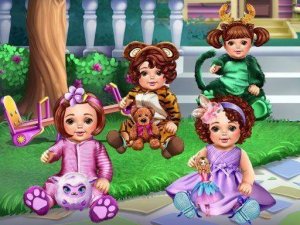
Kindergarten Dress Up Game
Reviews
Description
Game Introduction
Kindergarten Dress Up is a delightful dress-up game that lets players style cute kindergarten kids with a wide variety of clothing, accessories, and hairstyles. Choose from colorful dresses, fun hats, playful shoes, and more to create unique looks. This game encourages creativity and self-expression in a safe, family-friendly environment. Perfect for young children and anyone who loves fashion and design, Kindergarten Dress Up offers endless combinations for hours of fun.
How to Play
Start by selecting a character to dress up. Browse through different categories like tops, bottoms, shoes, accessories, and hairstyles. Click or tap on an item to apply it to the character. Mix and match different pieces to create the perfect outfit. Use the undo button to remove items and try new combinations. Once you are happy with the look, you can save or share your creation with friends and family.
Game Features
Fun dress-up gameplay with cute characters and colorful items. Simple tap or click controls make it easy for young children to play. A wide variety of clothing, accessories, and hairstyles to choose from. Undo button allows for easy experimentation. Option to save or share finished outfits.
Tips for Success
To get the most out of Kindergarten Dress Up, try mixing and matching different clothing categories to discover unexpected combinations. Use the undo button freely to experiment without worry. If you want to create a themed outfit, start with a base color or accessory and build around it. Sharing your creations with friends can inspire new ideas and make the game more social.
✅ Compatibility & Testing
Faq
Similar Releases
Fashion Stylist Dress Up Game
Creative dress up game with satisfying feedback. Great for fashion lovers of all ages.
Ice Queen Fashion Dress Up
Nice dress up game with many clothing options. Simple controls work well on any device.

Spring Wedding Dress Up
Charming dress up game with lovely spring details. Easy to play and very relaxing.

Super Doll Skin Doctor Care
A gentle, educational game that teaches skin care through play. Perfect for young children who love dolls.
Baby Hazel Thanksgiving Makeover
A charming dress up game that lets kids create a festive look for Baby Hazel. Simple and fun.

Heart Bangs Dress Up Game
Simple and fun dress-up game with clear steps. Great for creative fashion play.