
Reviews
Description
Course Navigation
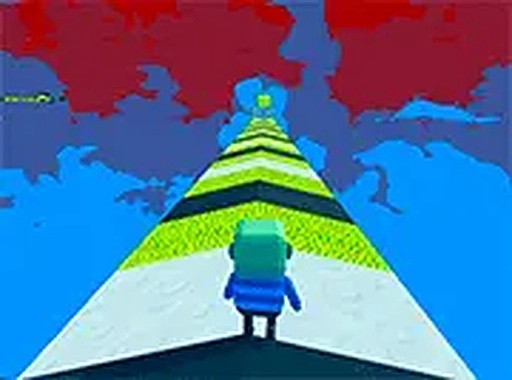
Each level in Platform Sprint 3D presents a series of platforms arranged in a 3D space. The player must move their character from the starting point to the finish by jumping between these platforms. Some platforms remain stationary, while others move along set paths. Success depends on observing the timing of moving platforms and choosing the right moment to jump. The courses are designed to be visually clear, with distinct colors and shapes that help players identify safe landing spots.
Sliding on Ice
Ice blocks appear throughout the courses as special surfaces that change how the character moves. When the character lands on an ice block, they slide across it without needing to press movement keys. This sliding effect can be used to maintain speed when crossing long gaps or to reach platforms that are slightly out of normal jumping range. However, sliding also reduces control, so players must plan their path to avoid sliding past the intended landing area.
Collectibles and Portals
Scattered across each course are star-shaped collectibles. Gathering these stars adds to the player's score and may open alternative routes within the level. Some stars are placed in plain sight, while others require a detour or a well-timed jump to reach. Glowing portals are also present in some levels. Entering a portal instantly moves the character to a different part of the course, which can shorten the path or provide access to otherwise unreachable areas. Using portals effectively requires knowledge of the level layout.
Controls and Accessibility
Platform Sprint 3D uses keyboard controls for movement and jumping. The game runs directly in a web browser, so there is no need to download or install any software. This makes it easy to start playing on any computer with an internet connection. The controls are responsive and designed for precise input, which is important for navigating the more challenging sections of each course. The game is free to play, with no in-game purchases or advertisements that interrupt the experience.
Visual Style and Atmosphere
The game features a clean, bright visual style with colorful environments. Platforms are clearly defined against the background, making it easy to see where to jump. The overall look is friendly and suitable for all ages, with no dark or frightening elements. The music and sound effects are light and upbeat, complementing the energetic gameplay without being distracting. This visual clarity helps players focus on the timing and coordination required to complete each course.
Compatibility
Similar Releases
Endless Dash - Arcade Platformer
Beauty Salon Makeover Puzzle

Costume Style Creative Fashion Game

Duck Merge Puzzle
Jigsaw Puzzle Fun: Charming Puzzles
Pet Spot the Differences Puzzle
Logic Puzzle Quests: Family Brain Teasers
LowPoly 3D Art Puzzle
Memoji History Match Puzzle

Player Comments
Sign in to comment
You must be logged in before posting a review or rating.
No account? Create one
No comments yet. Be the first to comment!